SNP-MERN and SNP-Spring
SNP-MERN and SNP-Spring are web-based systems developed under Activity 5 to enable rice researchers and breeders to visualize and analyze SNP (Single Nucleotide Polymorphism) and genotype data from rice genomes.
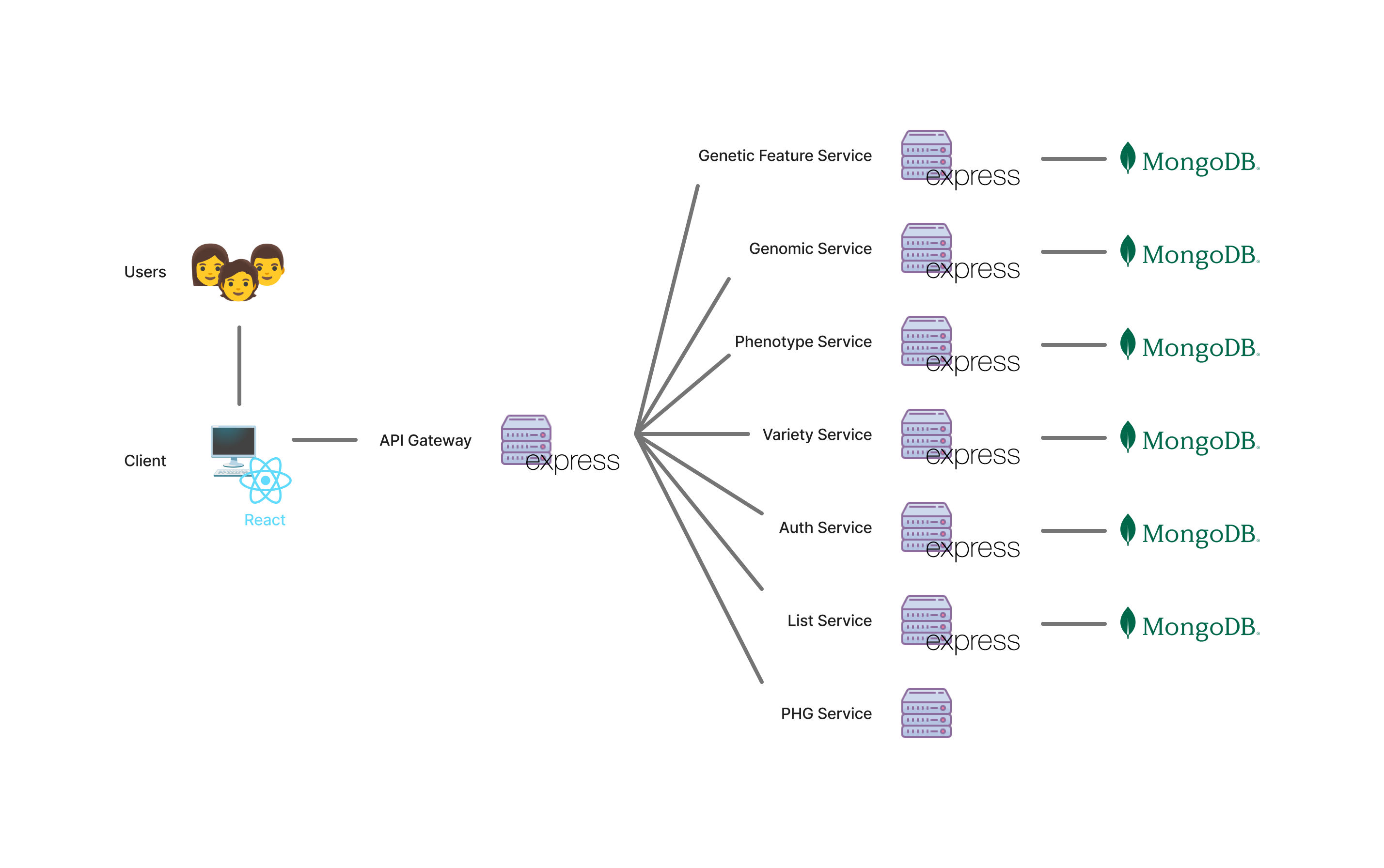
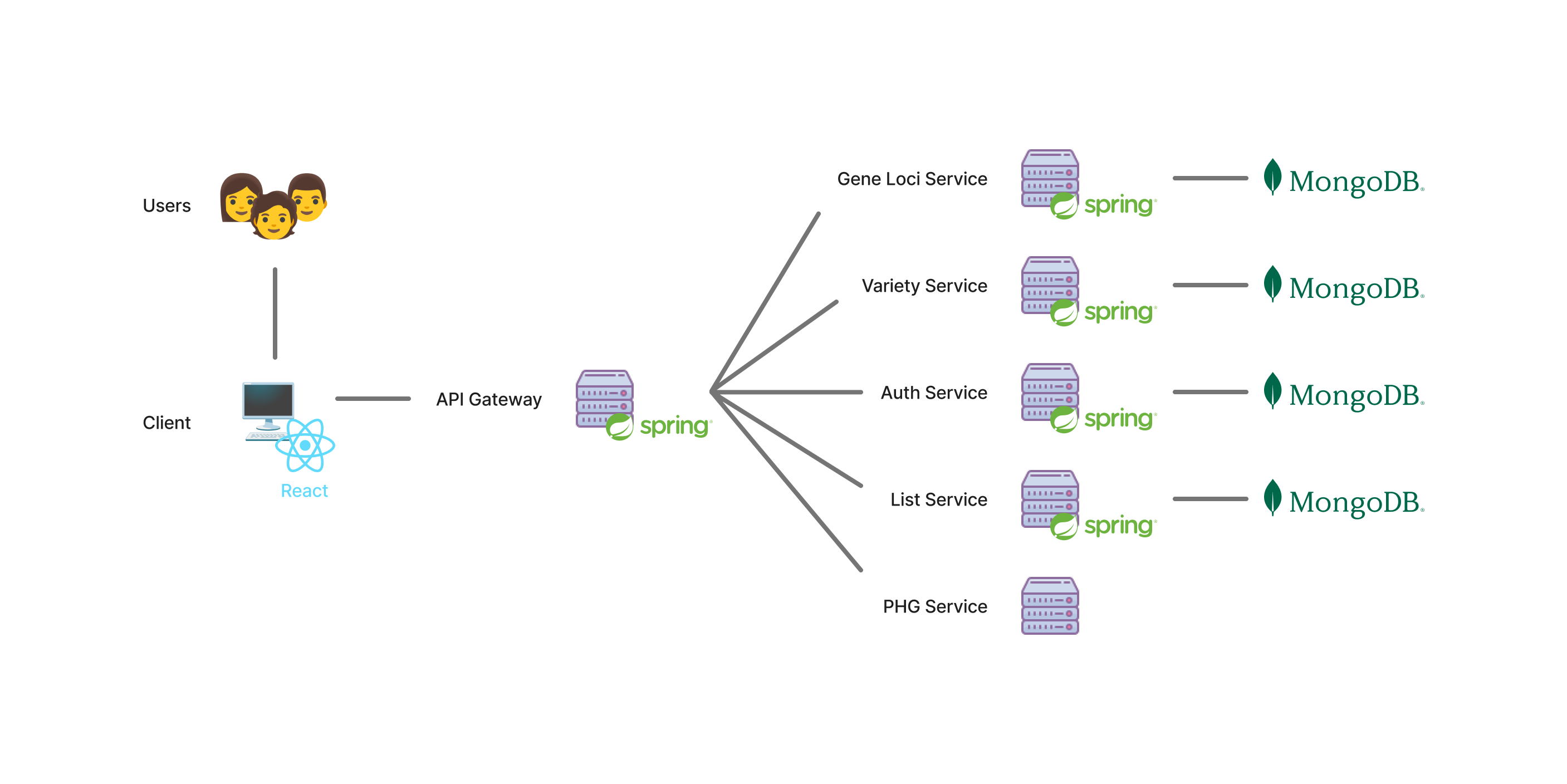
Both systems have an almost identical microservices architecture. This design allows individual components to be maintained or scaled independently, improving reliability and performance.
SNP-MERN System Architecture
SNP-MERN is built using the MERN stack: MongoDB, Express.js, React, and Node.js.
SNP-Spring System Architecture
SNP-Spring uses React for the frontend, Spring Boot for the backend, and MongoDB for the database.
What is an API?
An API (or Application Programming Interface) acts as a bridge between an application and its database.
Why We Make APIs
- Security: Prevents clients from having direct access to the database which may potentially be used for malicious intentions.
- Abstraction: Users don't need to know how or where data is stored.
- Reusability: The same API can serve multiple clients, whether it be a website, mobile app, terminal-based, etc.
- Consistency: Ensures all users receive data in a standard format.
- Scalability: Databases can be modified without breaking the frontend.
Introduction to Databases
A database is an organized system for storing, managing, and retrieving information.
Why We Need Databases
- Organization: Keeps data consistent and searchable.
- Reliability: Prevents data loss or duplication.
- Collaboration: Lets multiple people use the same data safely.
- Scalability: Handles growing data sizes as projects expand.
- Automation: Enables applications to access and analyze data automatically.
Relational vs. Non-relational Databases
| Feature | Relational / SQL | Non-Relational / NoSQL |
|---|---|---|
| Structure | Tables with rows & columns | Collections of documents, key-value pairs, etc. |
| Schema | Strict: data must follow a predefined structure of tables, columns, and data types | Flexible/Optional: each document can have different fields or structures |
| Data Relationships | Enforced: tables are linked through foreign keys and constraints | Loose: relationships are managed in the application layer, not by the database |
| Data Duplication | Normalized: data is split across tables to minimize redundancy; requires joins | Often denormalized: data is duplicated for faster reads; harder to update consistently |
| Examples | PostgreSQL, MySQL, SQLite | MongoDB, Redis, Cassandra, DynamoDB |
| Best For | Structured, transactional data | Unstructured or rapidly changing data |
PostgreSQL Basics
PostgreSQL is an open-source relational database management system.
Note: To try out the following commands, make sure you have completed the Day 2 setup guide through this link.
Service Management Commands
# Start PostgreSQL service
sudo systemctl start postgresql

# Check PostgreSQL service status
sudo systemctl status postgresql

# Stop PostgreSQL service
sudo systemctl stop postgresql
Connecting to PostgreSQL
# Connect as postgres user (default superuser)
# sudo -u <username> psql
sudo -u postgres psql

# Connect to a specific database
# sudo -u <username> psql -d <database_name>
sudo -u postgres psql -d rgdb
Structure of an SQL table
In SQL, data is stored in tables composed of rows and columns.
- Columns define the attributes or fields of the data.
- Rows represent individual records, each containing values for those attributes.
Essential psql Commands
-- List all databases
\l

-- Connect to a different database
-- \c <database_name>
\c rgdb

-- List all tables in current database
\dt

-- Describe the structure of a specific table
-- \d <table_name>
\d snp_featureloc

-- Quit psql
\q

-- Help with SQL commands
\h

-- Help with psql commands
\?
Basic SQL Operations
Note: Do not forget the semi-colon at the end of each operation
SELECT Queries
-- Retrieve all rows and columns from a table
-- SELECT * FROM <table_name>;
SELECT * FROM variantset;

-- Retrieve a table showing only the first `n` rows
-- SELECT * FROM <table_name> LIMIT <number>;
SELECT * FROM snp_featureloc LIMIT 10;

-- Retrieve specific fields from a table
-- SELECT <field1>, <field2> FROM <table_name>;
SELECT position, refcall FROM snp_featureloc LIMIT 10;

-- Retrieve rows from a table that match a specific condition
-- SELECT * FROM <table_name> WHERE <condition>;
SELECT * FROM snp_featureloc WHERE refcall = 'C' LIMIT 10;
SELECT * FROM snp_featureloc WHERE position BETWEEN 11217 AND 12434 LIMIT 10;
SELECT * FROM snp_featureloc WHERE (position BETWEEN 11217 AND 12434) AND refcall = 'A' LIMIT 10;

-- Retrieve specific fields with custom field names
SELECT refcall AS reference_call, position + 1 AS position FROM snp_featureloc WHERE refcall = 'C' LIMIT 10;
SELECT refcall reference_call, position + 1 position FROM snp_featureloc WHERE refcall = 'C' LIMIT 10;

-- Retrieve rows from a table, sorted by a field in descending order
-- SELECT * FROM <table_name> ORDER BY <field> <ASC or DESC>;
SELECT * FROM snp_featureloc ORDER BY position LIMIT 10;
SELECT * FROM snp_featureloc ORDER BY position ASC LIMIT 10;
SELECT * FROM snp_featureloc ORDER BY position DESC LIMIT 10;
INSERT Operations
-- Add a new row
-- INSERT INTO <table_name> (<field1>, <field2>) VALUES (<value1>, <value2>);
INSERT INTO snp_featureloc (snp_featureloc_id, refcall)
VALUES (30_000_000, 'A');

-- Add new rows at once
-- INSERT INTO <table_name> (<field1>, <field2>) VALUES (<values1>), (<values2>);
INSERT INTO snp_featureloc (snp_featureloc_id, refcall)
VALUES
    (30_000_001, 'T'),
    (30_000_002, 'G');

-- Add a new row and get back specific fields
-- INSERT INTO <table_name> (<fields>) VALUES (<values>) RETURNING <fields>;
INSERT INTO snp_featureloc (snp_featureloc_id, refcall)
VALUES (30_000_003, 'C')
RETURNING *;
UPDATE Operations
-- Modify values in an existing row that matches a specific condition
-- UPDATE <table_name> SET <field> = <value> WHERE <condition>;
UPDATE snp_featureloc
SET position = 200
WHERE snp_featureloc_id = 30_000_000;

-- Modify multiple values in an existing row at the same time
-- UPDATE <table_name> SET <field1> = <value1>, <field2> = <value2> WHERE <condition>;
UPDATE snp_featureloc
SET position = 300, snp_featureloc_id = 40_000_000
WHERE snp_featureloc_id = 30_000_000;

-- Modify data in rows that match multiple conditions
-- UPDATE <table_name> SET <fields> = <value> WHERE <condition>;
UPDATE snp_featureloc
SET refcall = 'T'
WHERE snp_featureloc_id = 40_000_000 AND position = 300;
DELETE Operations
-- Delete rows that match a specific condition
-- DELETE FROM <table_name> WHERE <condition>;
DELETE FROM variant_variantset WHERE variant_feature_id = 10;
DELETE FROM variant_variantset WHERE hdf5_index < 5;

-- Delete all rows from a table (use with extreme caution!)
-- DELETE FROM <table_name>;
DELETE FROM users;
Basic JOIN
-- Combine rows from two tables based on matching column values
-- SELECT <field> FROM <table1> JOIN <table2> ON <table1.field> = <table2.field>;
SELECT * FROM snp_featureloc JOIN variant_variantset
ON snp_feature_id = variant_feature_id
LIMIT 10;
Example complex query for searching by genotype
SELECT
    sfl.snp_feature_id,
    sfl.srcfeature_id - 2 AS chromosome,
    sfl.position + 1 AS "position",
    sfl.refcall,
    vvs.hdf5_index AS allele_index,
    v.variantset_id AS type_id,
    v.name AS variantset
FROM
    snp_featureloc sfl
    JOIN variant_variantset vvs ON sfl.snp_feature_id = vvs.variant_feature_id
    JOIN variantset v ON vvs.variantset_id = v.variantset_id
WHERE
    sfl.organism_id = 9
    AND sfl.srcfeature_id = 3
    AND sfl.position BETWEEN 11217 AND 12434
    AND v.name IN ('1k1')
ORDER BY
    sfl.position;
MongoDB Overview
MongoDB is a non-relational (NoSQL) database.
Unlike SQL databases that use tables with rows and columns, MongoDB stores data in collections of documents.
Analogy:
| SQL Term | MongoDB Equivalent |
|---|---|
| Table | Collection |
| Row | Document |
| Column | Field |
A document in MongoDB is a key-value structure written in JSON syntax. It can contain nested objects and arrays, allowing rich and flexible data representation.
Example document from the snp_featureloc collection:
{
  "_id": 1,
  "position": 1127,
  "refcall": "C",
  "organism": {
    "abbreviation": "O.sativa spp japonica nipponbare",
    "genus": "Oryza",
    "species": "sativa japonica nipponbare",
    "common_name": "Japonica nipponbare"
  },
  "feature": {
    "name": "Chr1",
    "uniquename": "chr01",
    "seqlen": 43270923,
    "type": {
      "name": "chromosome",
      "definition": "Structural unit composed of a nucleic acid molecule which controls its own replication through the interaction of specific proteins at one or more origins of replication.",
      "cv": {
        "name": "sequence",
        "definition": null
      }
    }
  },
  "variantset": {
    "name": "1k1",
    "description": null
  },
  "variant_type": {
    "name": "SNP",
    "definition": "SNPs are single base pair positions in genomic DNA at which different sequence alternatives exist in normal individuals in some population(s), wherein the least frequent variant has an abundance of 1% or greater.",
    "cv": {
      "name": "sequence",
      "definition": null
    }
  }
}
Data Duplication
In relational databases like PostgreSQL, data is stored in separate tables and linked using foreign keys. This normalized design avoids duplication by keeping related information in different tables. When combined information is needed, a JOIN operation is used to merge the tables.
MongoDB, on the other hand, encourages denormalization: storing related information together within a single document. This approach can result in data duplication because the same fields name might appear in several documents. However, the trade-off is to improve performance and simplifies queries.
Example in PostgreSQL:
| Table: snp_featureloc | |||
|---|---|---|---|
| snp_featureloc_id | organism_id | position | refcall |
| 1 | 9 | 1127 | C |
| Table: organism | |||||
|---|---|---|---|---|---|
| organism_id | abbreviation | genus | species | common_name | comment |
| 9 | O.sativa spp japonica nipponbare | Oryza | sativa japonica nipponbare | Japonica nipponbare | (null) |
To combine data from both tables, we use a JOIN:
SELECT position, refcall, genus, species, common_name
FROM snp_featureloc
JOIN organism ON snp_featureloc.organism_id = organism.organism_id;
This avoids data duplication. The organism’s details are stored only once, even if thousands of SNPs belong to the same organism.
Example in MongoDB
Instead of separating snp_featureloc and organism, both can be stored in one document:
{
  "snp_featureloc_id": 1,
  "position": 1127,
  "refcall": "C",
  "organism": {
    "organism_id": 9,
    "abbreviation": "O.sativa spp japonica nipponbare",
    "genus": "Oryza",
    "species": "sativa japonica nipponbare",
    "common_name": "Japonica nipponbare"
  }
}
This makes it easy to retrieve all relevant information for one SNP in a single query, without performing a JOIN. However, if the same organism appears in many documents, its details are repeated, introducing data duplication.