Note: To follow along this module, make sure you have PostgreSQL installed. See PostgreSQL installation instructions from Day 2 setup guide through this link.
1. Introduction
This session introduces the Chado-based schema used in SNP-Seek and demonstrates how genomic data are loaded into the database using either a Java Swing Loader or a Bulk Loading Script.
2. SNP-Seek Database Schema
The SNP-Seek database is built on the Chado schema — a modular, ontology-driven schema designed for biological databases.
It organizes biological data using ontology terms (controlled vocabularies) and relationships between entities such as genes, features, and variants.
Commonly Used Chado Tables in SNP-Seek
| Table | Description |
|---|---|
| db | Stores information about external databases or sources (e.g., reference databases like GenBank or Ensembl). |
| cv | Represents controlled vocabularies (e.g., SO for sequence ontology, GO for gene ontology). |
| cvterm | Holds specific ontology terms used to describe biological entities or relationships (e.g., “SNP”, “chromosome”, “gene”). |
| organism | Contains taxonomic and descriptive data about species and subspecies used in the study. |
| feature | Central table that stores genomic features such as genes, SNPs, or contigs. |
| snp_feature | SNP-specific features derived from the main feature table, representing variant loci. |
| snp_featureloc | Stores the genomic location (e.g., chromosome, start, end position) of each SNP feature. |
| stock | Represents biological samples or accessions, such as plant lines, germplasm, or experimental stocks. |
| stock_sample | Links biological samples (stock) to specific datasets or sequencing runs. |
| variantset | A collection or group of variants associated with an experiment, study, or dataset. |
| variant_variantset | A join table linking individual variants (features) to their variant sets. |
Schema Concept
- Ontology-Driven: All biological types (e.g., SNP, gene, transcript) are defined through
cvterm.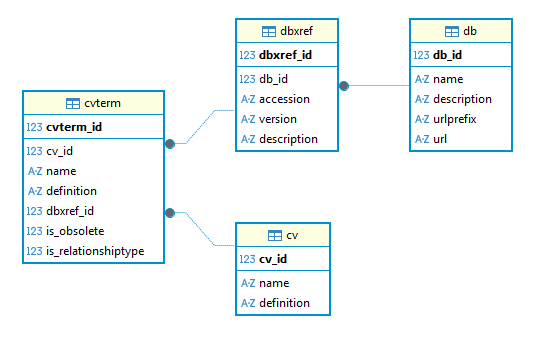
- Modular: Each biological concept (organism, feature, stock, variant) is stored separately but linked through foreign keys.
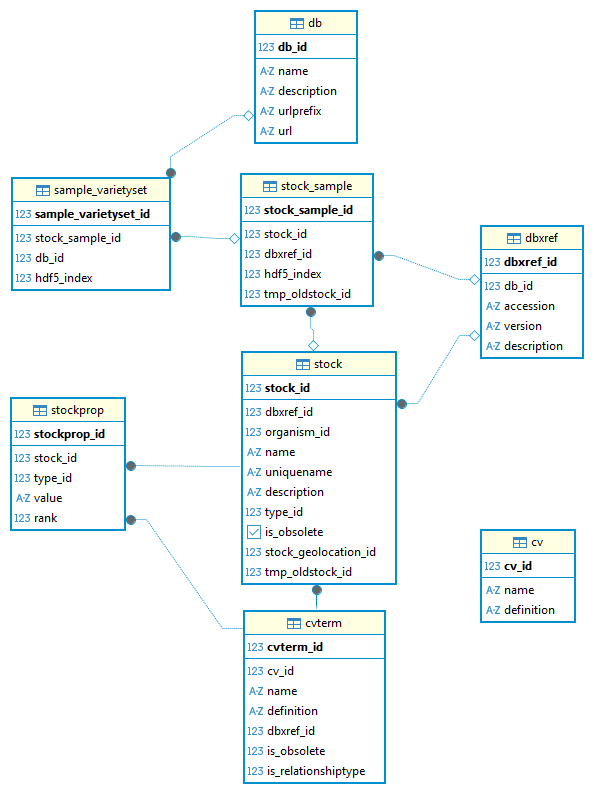
- Extensible: New datasets can be integrated without redesigning the schema.
🧪 Hands-On Exercise: Restoring and Exploring the Chado Schema
This exercise helps participants explore the SNP-Seek database structure.
Step 1: Restore the Chado Schema
Here is database dump file (e.g., chado_dump.sql), restore it using:
psql -h localhost -U <USERNAME> -d <DB_NAME> -f chado_dump.sqlIf you don't have a database yet, create one first:
createdb -h localhost -U <USERNAME> <DB_NAME>Tip: Use \l to list databases and confirm that chado_demo exists.
Step 2: Connect to the Database
psql -h localhost -U <USERNAME> -d <DB_NAME>Step 3: Explore the Schema
Inside psql, list tables:
\dt
--- Try filtering by keyword
\dt *snp*
\dt *stock*
Step 4: View Table Structure
Check how each table is defined:
\d cvterm
\d snp_feature
\d variantset
Step 5: Explore Relationships
Run a few joins to understand data connections:
SELECT o.genus, o.species, s.name AS stock_name
FROM organism o
JOIN stock s ON s.organism_id = o.organism_id;
3. Data Loading Workflow
The data for loading is generated in the preprocessing stage.
There are two ways to load data:
- Using a Java Swing-based Loader, or
- Using a command-line bulk loading script.
3.1 Genotype Loader (Java Swing)
The loader is implemented in Java and provides a graphical interface for loading genomic data into the database.
🔗 Repository Information
- Loader repository: https://bitbucket.org/dagsbarboza/genotypeloader/
- Dependency (Chado Model library): https://bitbucket.org/dagsbarboza/chadomodel/
- Bulk insert library: PgBulkInsert – used to efficiently insert large genomic datasets into PostgreSQL.
⚙️ Prerequisites
- Java JDK version 1.8 installed
- Database connection settings configured in the loader
▶️ Running the Loader
Execute:
java -cp "genotypeloader.jar;lib/*" org.irri.genotype.GenotypeLoaderUI2📂 Input Files Required
- Genotype HDF5 file
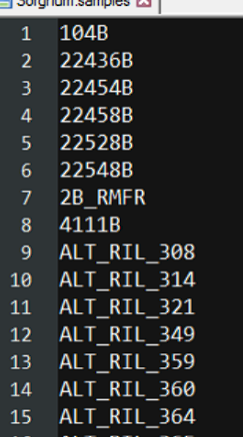
- Sample list with Sample IDs
- A text file containing sample names (in the same order as in the genotype matrix)
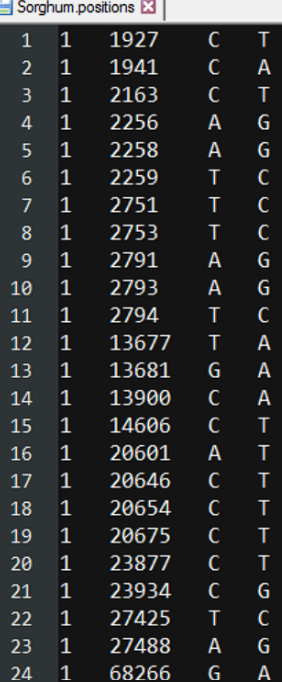
- SNP positions
- Genomic coordinates for SNPs
Examples:
🖥️ The Loader UI
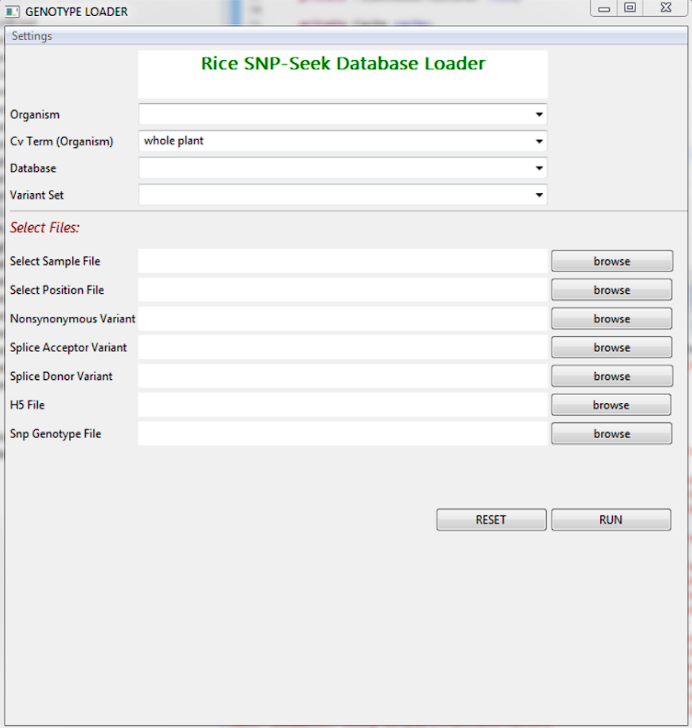
3.2 Bulk Loading Script
An alternative to the GUI is a bulk loading script that automates data ingestion into the PostgreSQL Chado schema.
💡 Features
- Validates input files (sample list, SNP positions, HDF5 file)
- Looks up or inserts CV terms, organism, and dbxref entries
- Generates CSV files for each table:
StockSample.csvSampleVarietySet.csvSnpFeature.csvVariant_variantset.csvSnp_FeatureLoc.csv
- Updates sequence values to prevent ID conflicts
- Performs efficient bulk copy using
\copy
🔗 Repository
- Script repository: https://github.com/1K1RG/1k1RG-Scripts.git
⚙️ Setup Instructions
git clone https://github.com/1K1RG/1k1RG-Scripts.git
cd 1k1RG-Scripts/loader
chmod +x uploadDataset.sh
🧩 Prerequisites
- PostgreSQL client (
psql) - Database access credentials
- Input files:
- Sample list file
- SNP positions file
- HDF5 filename
▶️ Usage
./uploadDataset.sh genodb admin localhost 5432 secret samples.txt positions.txt data.h5| Parameter | Description |
|---|---|
DB_NAME | Target database name |
VARIANT_NAME | Variant set Name |
SAMPLE_FILE | Path to list of stock/sample names |
POS_FILE | Path to SNP positions file |
ORGANISM_NAME | Organism |
H5_FILE_NAME | HDF5 filename |
✅ Expected Outcome
After successful execution:
- Stock, stock_sample, SNP, and variant data are fully inserted.
- Relationships between samples and SNPs are properly linked.
- Data is queryable using SQL joins and integrated into SNP-Seek.
4. Hands-On Exercises
You can download the input example file here:
Exercise 1: Do a bulk upload.
First, make sure you're in the directory where the CSV file is located, then follow these steps:
Step 1: Create a new database
# Syntax: createdb -h localhost -U <USERNAME> <DB_NAME>
createdb -h localhost -U <USERNAME> bulkload_demo
Step 2: Connect to PostgreSQL and switch to the new database
# Syntax: psql -h localhost -U <USERNAME> -d <DB_NAME>
psql -h localhost -U postgres -d bulkload_demo
Step 3: Perform the bulk upload
Once connected to the database, run the copy command:
\copy feature FROM '11-feature-nipponbare.csv' WITH (FORMAT csv, HEADER true)Exercise 2: try using script
Make sure the sample list and position files are in the 1k1RG-Scripts/loader directory, then run:
# add executable to file
chmod +x uploadDataset.sh

# run upload dataset
./uploadDataset.sh sampleds sampleds sample_list.txt pos_500_per_chr.txt 'Japonica nipponbare' test_file.h5
Exercise 3: Bulk Loading Practice
- Verify row counts in
stock_sample,snp_feature, andvariantset.